Who needs me?
Open the review queue or inspect a lead’s context and requested check-in date.
INBOX DISCOVERY + PERSONAL AI FOLLOW-UP
Find promising inquiries in your inbox. Organize your hot, warm, and lukewarm leads. Follow up with a personal email when the timing is right.
One dashboard shows what needs you, what’s scheduled, and which conversations become confirmed wins. We handle the setup and ongoing care.
Compare paid plans. Personal setup and ongoing care included.
Essentials: $299/month + $499 setup
250 active leads + 1,000 AI emails per billing month
“We have a date and 40 guests. How do we book?”
“Thanks for the estimate. We’ll take a look.”
“We’re interested, but waiting on a job offer.”
You approve who enters the pipeline. Their timing shapes the follow-up.
Find the opportunity.Review inquiries you may have overlooked.
Make the next step personal.Keep their context, timing, and your voice.
See what happens.Track replies, next actions, and recorded wins.
ONE PLACE TO RUN YOUR FOLLOW-UP
See the big picture and the next action together. Review an email, check an upcoming follow-up, or adjust your program without piecing the story together across screens.
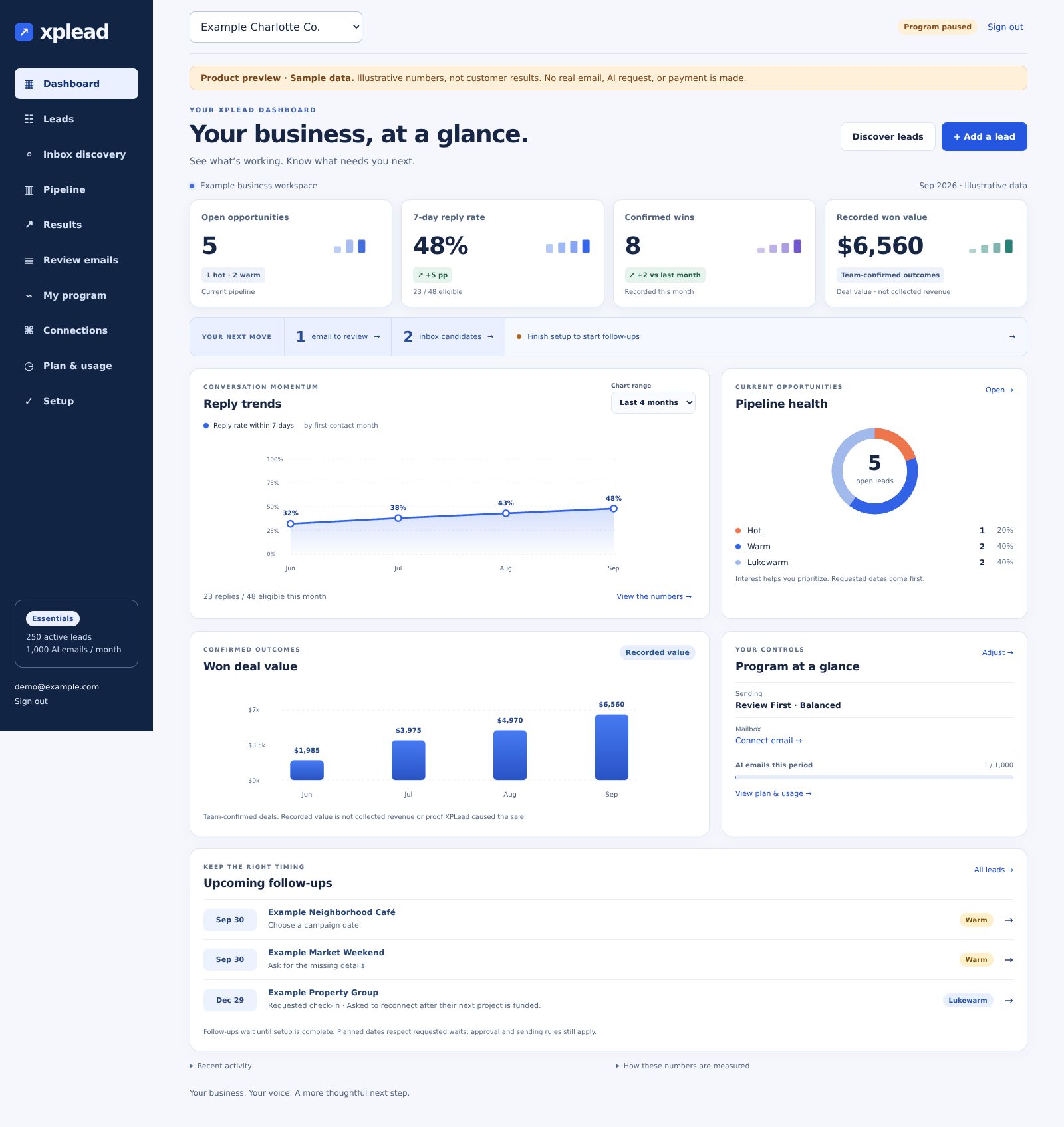
Open the review queue or inspect a lead’s context and requested check-in date.
See monthly reply trends with the conversation counts behind each percentage.
Track wins confirmed by your team and the deal values you record.
Fictional contacts and sample figures demonstrate the working interface; they are not customer results. Recorded deal value is not collected revenue or proof of sales caused by XPLead.
Client workspace shown in product preview. Email-provider compatibility, inbox-history features, availability, and setup scope are confirmed before payment.
START WITH THE INQUIRIES YOU ALREADY HAVE
A pricing question you meant to answer. A proposal that stalled. Someone who asked you to check back later. Inbox discovery helps surface potential inquiries for your review.

Discovery suggests potential inquiries using conversation and activity signals. You review relevance and permission before enrollment. Priority scores are guides, not predictions of a sale.
THE MESSAGE AND THE TIMING MATTER
A useful follow-up answers a question, helps with a decision, or picks up the conversation when they asked. We shape the emails around your business and each lead’s situation.
See email examplesMessages draw on your approved offers, the conversation, and the next step that makes sense.
Set a Gentle-to-Persistent style. Individual dates still respect requested waits, pauses, and opt-outs.
Approve emails individually, or allow routine follow-up within agreed rules. Step in whenever your judgment is needed.
SOFTWARE + SOMEONE WHO MAKES IT WORK
You should not have to become a CRM specialist to keep a good inquiry moving.
We identify a real follow-up gap, confirm your tools, and build around that process. Start with Essentials and expand when the need is clear.
Scott Jensen brings a publisher’s focus on clear, useful communication to your setup. Your offers, voice, and customer questions shape the program.
Managed plans include evaluation of leading AI models and upgrades when testing shows a benefit for your follow-up. You do not have to research or switch models yourself.
Your dashboard combines follow-up activity, replies, and team-confirmed outcomes. Open the details when you want more than a headline number.
IS IT A GOOD FIT?
Realtors, service businesses, caterers, event venues, and professional firms: start with inquiries, consultations, proposals, or quotes that need thoughtful follow-through.
For a coffee shop or restaurant, think catering and private events. The value depends on your inquiry volume, margins, and sales process.
Find my best starting pointSERVICES & PRICING
Essentials includes the lead pipeline, personal AI follow-up, and dashboard in one managed program. Start with one workflow. Choose Growth when you need more.
Find overlooked inquiries, follow up personally, and keep your next steps in one place.
For an owner who wants one sales process handled. We confirm scope and availability before payment.
Keep new inquiries, open quotes, and suitable repeat-business conversations moving.
For a team with several follow-up needs. We confirm your setup cost and capacity in writing.
We build a fixed email sequence in the software you already use.
For a business that already has the software and a person to run it. Ongoing AI management is not included.
Essentials: $499 setup + $299/month. Growth: $599/month + quoted setup. Launch: $795 once. We confirm connections, usage allowances, and terms before payment.
Need more capacity? Each $99/month capacity pack adds 250 active leads + 1,000 AI emails to either managed plan. See counting and upgrade rules.
Compare all three plansBEFORE YOU START
No. You choose an inbox history range and review suggested inquiries. A contact must be confirmed as an appropriate sales inquiry before enrollment. Discovered leads start in Review First.
The lead’s conversation, requested dates, and your program settings shape the timeline. Someone asking to book needs a different next step from a buyer waiting on a job. A request to wait takes priority over intensity.
Current pipeline, observed reply rates, upcoming follow-ups, and wins confirmed by your team. Reply rates show their underlying counts. Recorded won value uses the deal values you enter; it is not verified revenue.
We confirm your email provider’s compatibility, connection method, and available features before payment. Growth can include one supported CRM connection within the written setup scope.
We confirm that your chosen plan fits your needs, check supported connections and availability, and agree on setup scope and fees before payment. Then we guide your onboarding. Submitting the form does not start a subscription.
START WITH YOUR BUSINESS
Choose a paid plan and tell us what needs follow-up. We confirm your connections, setup scope, and fees before you commit.
Choose your plan. We guide your setup.